Right now, somebody in your town is typing “electrician near me” into their phone.
The first thing they see is not a website. It is three electricians with a green Google tick, a star rating, and a big blue Call button. One tap and a phone rings.
If your shop is one of those three, that call is yours. If it is not, a competitor just picked up a job you never knew existed.
That top spot is called a Local Services Ad. And here is the part most electricians never get told: you do not pay for the ad to show. You only pay when the phone actually rings.
Hooked Up Electric in Merkel, Texas has been sitting in that spot for over two years. A hundred to two hundred calls a month. Four counties instead of one. The owner runs the trucks; the ads run themselves.
That was not luck, and it was not a big budget. It was a handful of settings and one daily habit that almost nobody does. Google never explains any of it. This guide does.
Read it once and you will know how to get into that top spot, how to stay there, and the two mistakes that make the calls stop for good.
What a Local Services Ad actually is
A Local Services Ad is Google’s “call a tradesman” box. It sits at the very top of the page, above the normal ads, above the map, above every website.
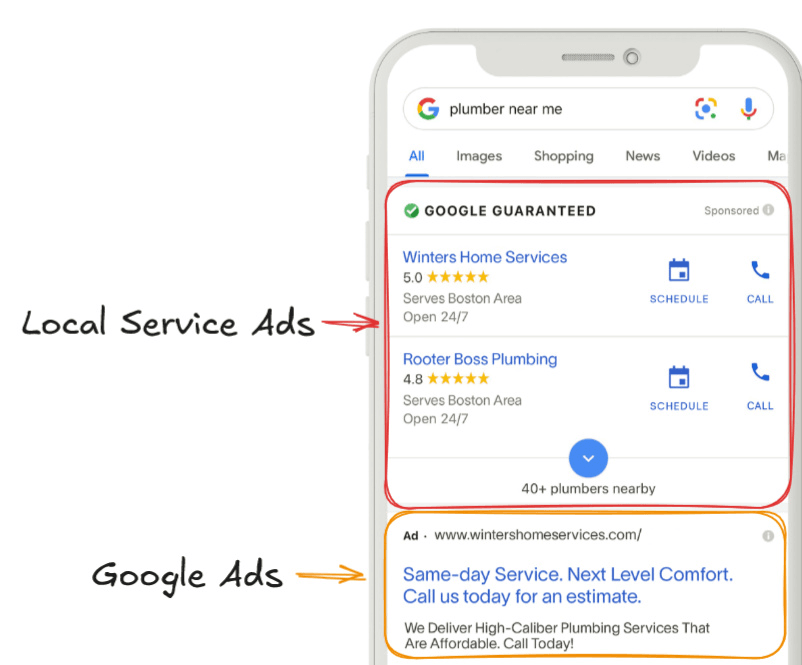
Three things make it different from every other ad you have been sold:
- You only pay when someone calls or messages you. Not when they look. Not when they click.
- Google vets you first. Licence, insurance, background check. Pass, and your ad carries a green “Google Guaranteed” tick that customers trust.
- There are no keywords to manage. You tell Google what jobs you do and where you work. It handles the rest.
The box does not appear on every search. In most US towns we see it on roughly half of electrician searches. When it does show, it owns the screen.
Why we turn this on before anything else
Every electrician we work with has been burned by advertising before. Yelp. Angi. Facebook. A “Google Ads guy” who spent $3,000 and sent four tyre-kickers.
Here is how those stack up against Local Services Ads for an electrical shop:
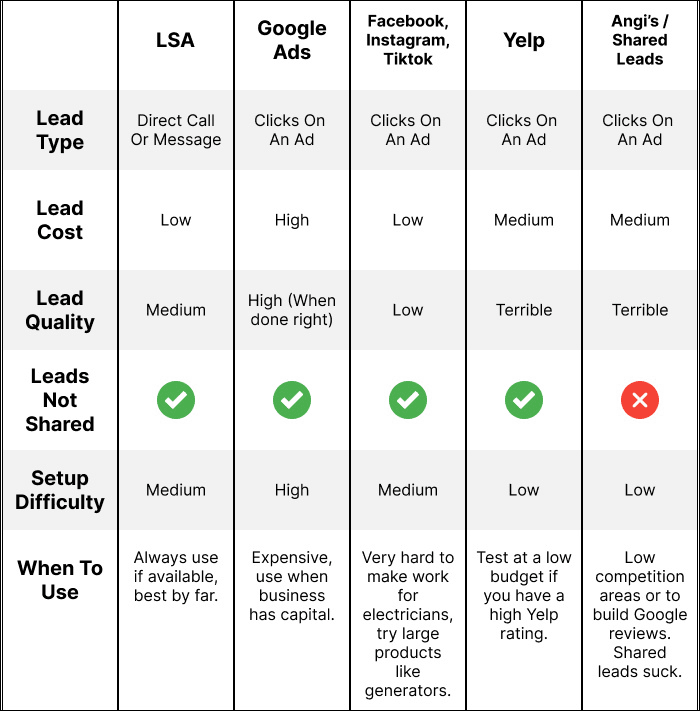
Normal Google Ads still have a place, but they are the expensive lane. You pay every time someone clicks, whether they call or not. We turn those on later, once Local Services Ads are already booking work.
Shared lead sites like Angi sell the same homeowner to four electricians at once. You are racing three other shops to the phone. We do not recommend them.
What the numbers look like
Local Services Ads start slow. The first few weeks are quiet. Then, if you handle the calls properly, it builds month after month.
Here is one electrical shop we started from nothing:
| Month | Ad spend | Calls | Jobs booked | Cost per booked job |
|---|---|---|---|---|
| First month | $288 | 24 | 9 | ~$32 |
| Month 2 | $1,231 | 102 | 36 | ~$34 |
| Month 3 | $1,719 | 115 | 50 | ~$34 |
| Month 4 (December) | $1,320 | 89 | 22 | ~$60 |
| Month 5 | $2,122 | 115 | 52 | ~$41 |
Read that last row again. 52 booked electrical jobs for $2,122 in ads. About forty dollars a job. What is one panel upgrade worth to you?
Here is a peak month from a bigger, multi-location electrical company:
| Ad spend | Calls | Revenue from those calls | Return |
|---|---|---|---|
| ~$4,650 | 117 | ~$95,000 | ~20× back |
And the long game: Hooked Up Electric has held 100 to 200 calls a month for over two years and grown from one county to four. Their full story is on the Hooked Up case study.
Local Services Ads can pay for a new van every quarter. They can also go dead in a fortnight. The difference is everything below.
What to have ready before you sign up
Most electricians get stuck at signup for weeks, sometimes months. Nearly every time, it is because paperwork did not match. Get these together first and it goes smoothly.
- Your insurance certificate as a PDF or clear photo
- Your electrical licence, photographed, for every state or area you claim
- Your business name and address, exactly as they appear on those documents. One letter off and Google rejects you without saying why.
- A Google Business Profile (your listing on Google Maps) with at least five reviews and “Electrician” set as the main category
- The owner’s name and email for a background check
- A credit card with enough limit to cover the budget you will set
Signing up and getting the green tick
Sit down at a computer, not your phone. Go to Google’s Local Services Ads page, sign in with the Google account that owns your Business Profile, and click Get started.
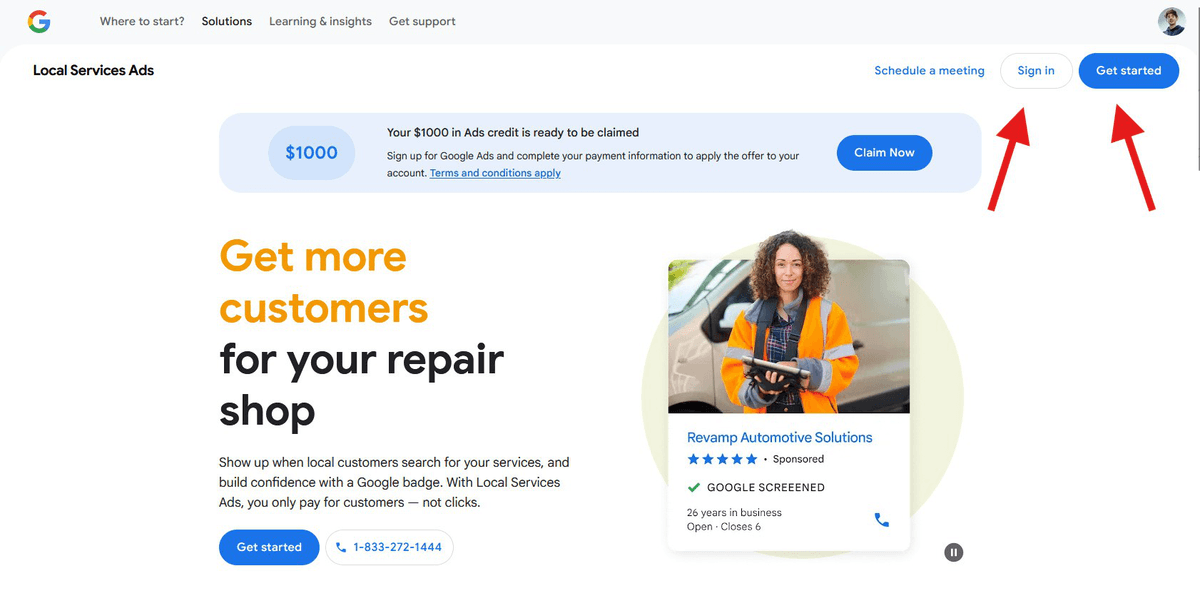
Fill in the forms slowly and copy your details straight from your documents. Then check your email and the dashboard every day until you are approved.
If anything gets stuck, phone Google’s Local Services support. Do not email. Emails sit for weeks; a phone call usually sorts it the same day.
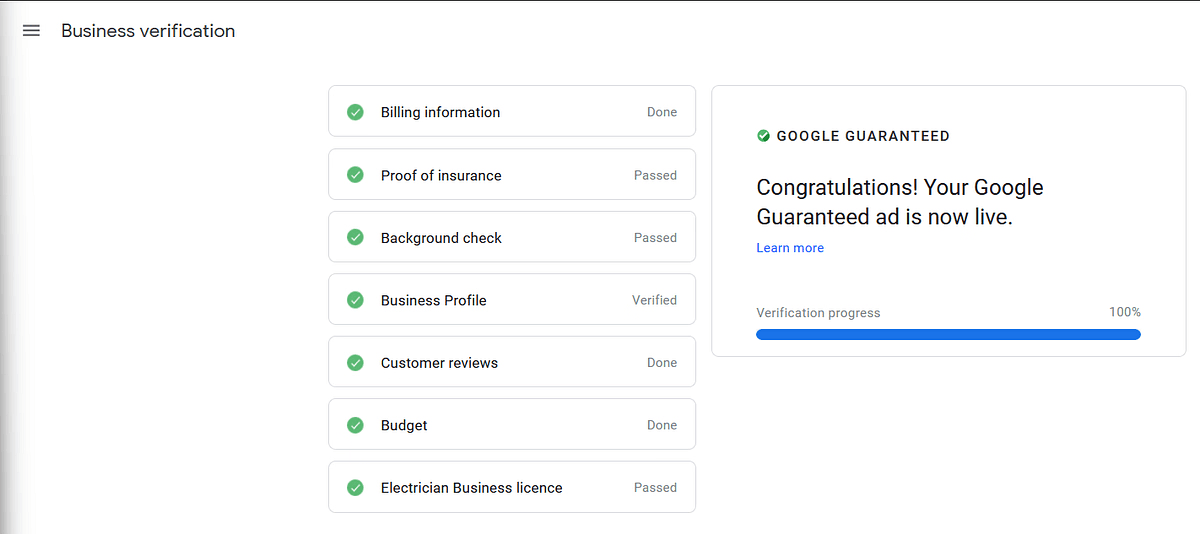
When every line turns green, your ad is live and you have the badge:
Setting up your profile the right way
This is where most electricians leave money on the table. Google gives you a dozen settings and explains none of them. Here is what each one should be, and why.
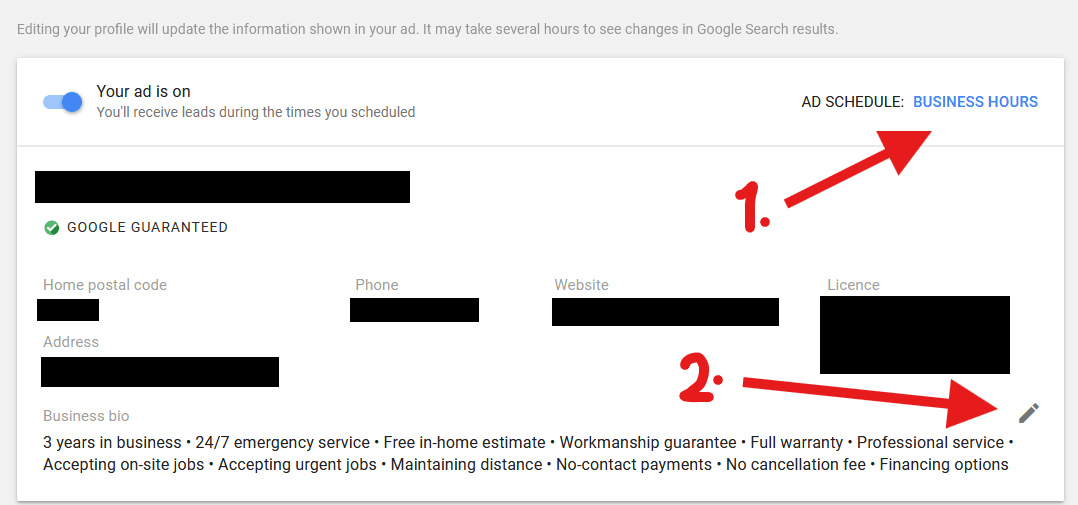
1. Hours and your business highlights
Set your hours to the times someone will actually pick up the phone. Not the hours you would like to be open. If nobody answers at 7pm, do not list 7pm. A missed call hurts you more than a closed sign.
Then pick six highlights for your ad. Choose the ones a homeowner cares about: licensed and insured, emergency service, free estimates, warranty on work. Only pick what is true.
2. Budget and job types
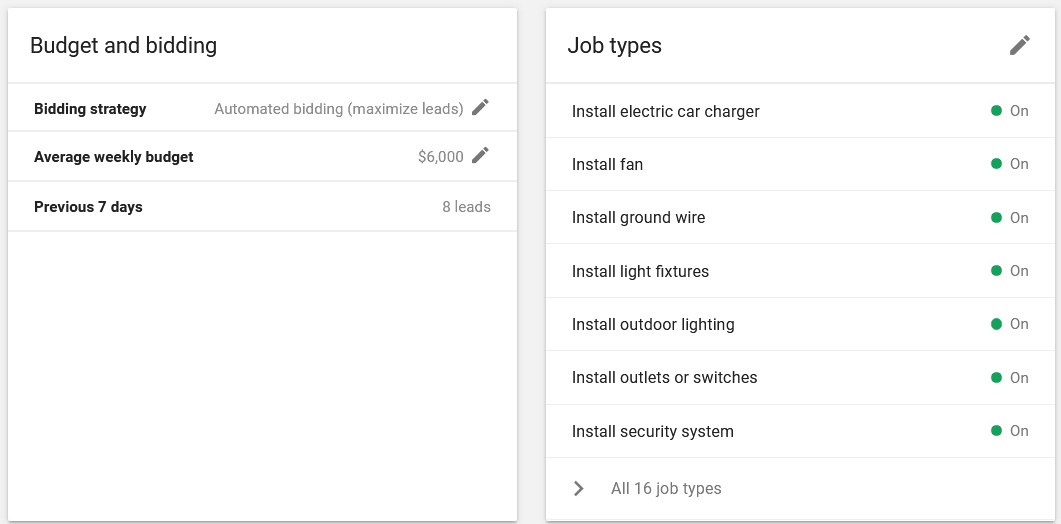
Leave bidding on Automated. Then set your weekly budget higher than you expect to spend. That sounds backwards, so here is why.
Google almost never spends your full budget on Local Services Ads. On our accounts it rarely reaches half. A high number tells Google “send me plenty,” and you can always lower it later. Just keep it under your card limit, because Google checks.
For job types, tick everything you are willing to do. Panels, EV chargers, ceiling fans, outlets, the lot. If it is not ticked, Google will not send you that job.
3. Photos and message settings
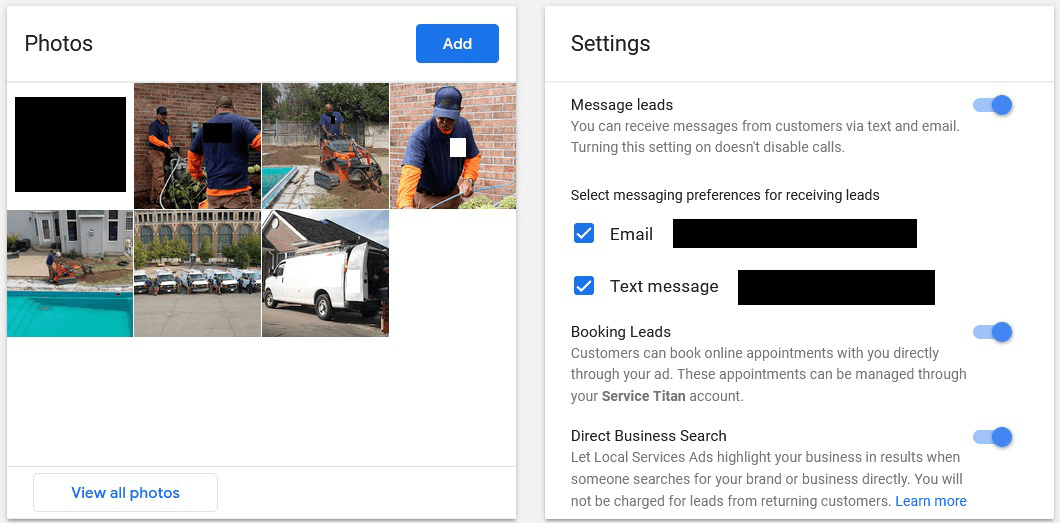
Upload your logo and real photos of your crew doing real work. Homeowners want to see the person who is coming to their house. One van photo is plenty. Faces beat fleets.
Turn Messages on. Yes, text leads are usually lower quality than phone calls. But Google rewards profiles that accept every kind of contact, and you will get more phone calls too.
4. Service area
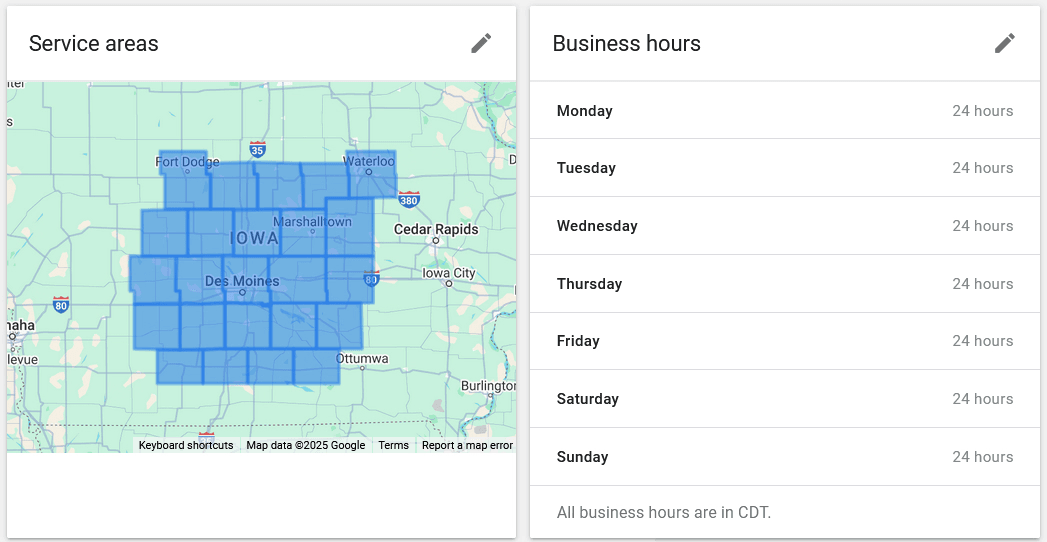
Add every town or county you want work in, but keep it within about two hours’ drive of your base. Google knows where you are. Claiming half the state makes you look less local, and you drop down the list.
The hidden score that decides who gets the calls
Here is what Google does not tell you. Every Local Services account has a score. You cannot see it. But it decides your position in that top box, and the electrician in position one gets the lion’s share of the calls.
Worse: once that score drops badly, it almost never comes back. We have watched shops go from three calls a day to none and never recover on the same account.
The two things that break it for good
- Missed calls, or leaving people on hold. Google times how fast you pick up. Aim for under 30 seconds, nine calls out of ten. If your phone goes to voicemail during business hours, fix that before you spend a dollar.
- Ignored messages. Reply the same day, every time. Google compares your speed with the other electricians in your area.
The smaller things that chip away at it
- A budget set too low
- Service areas more than two hours away
- No photos, or half the settings left blank
- Messages switched off
- Leads with no name or notes (more on this next)
- Changing your budget every few days
- A weak Google Maps listing or a website that never shows up
That last one matters more than people think. Local Services Ads boost a shop that already looks good on Google. They rarely rescue one that does not.
The 5-minute daily habit that keeps calls coming
This is the part almost every electrician, and almost every agency, skips. It is also the main reason Hooked Up is still getting calls two years on.
Every working day, open your leads and deal with each one. Here is exactly what that means.
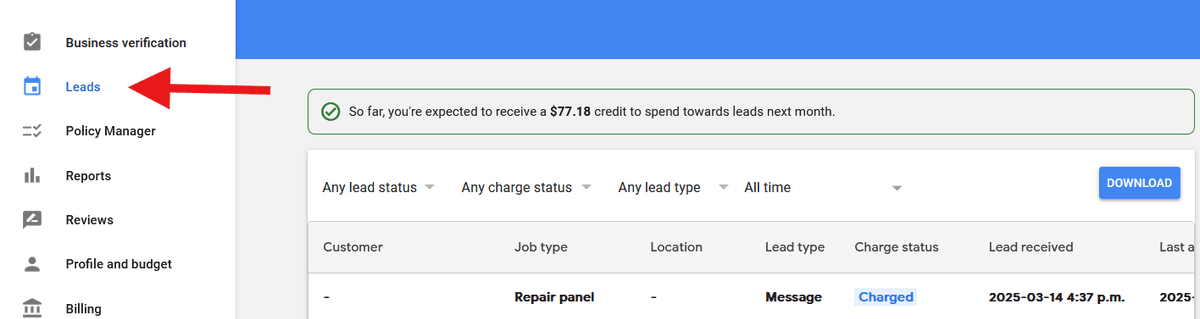
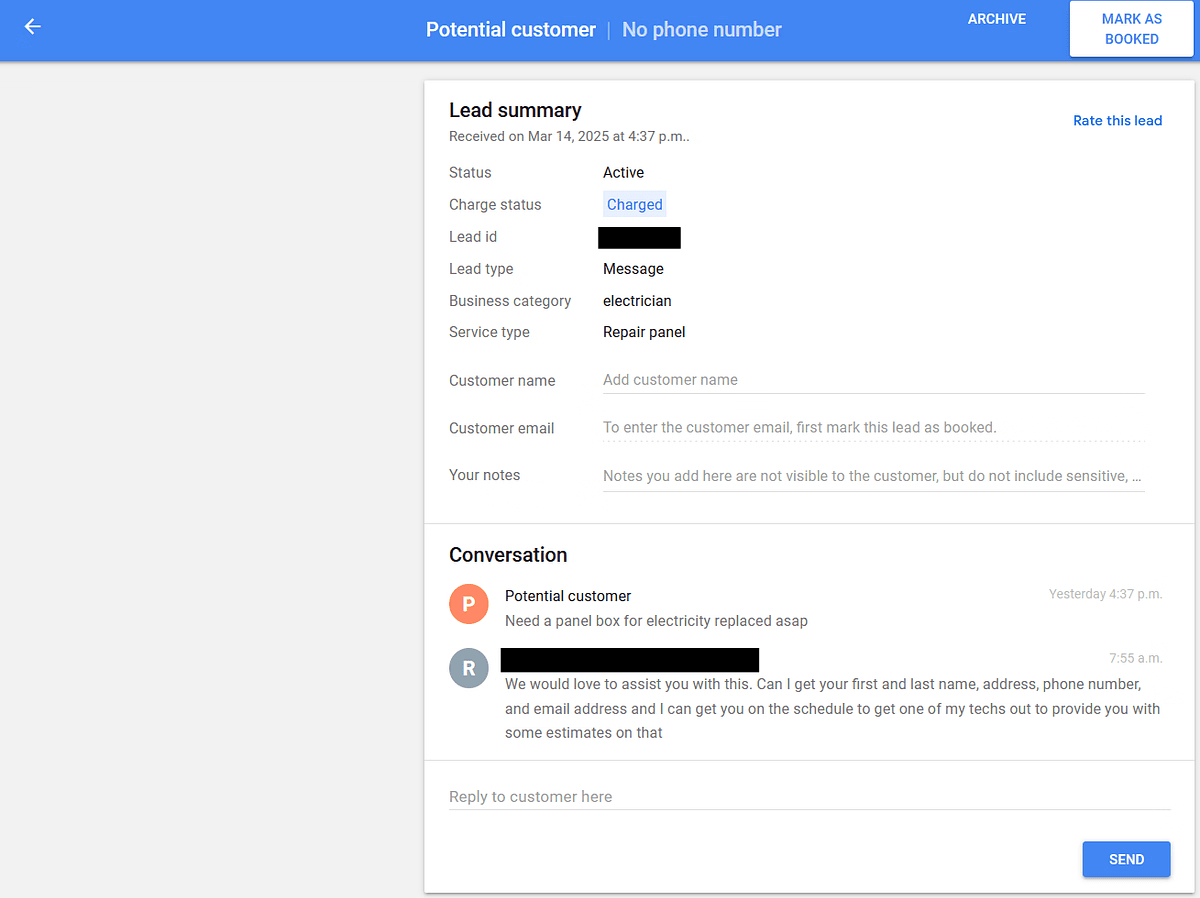
Step 1: Give every lead a name and a note
Click on the lead. Type the customer’s name and a quick note about the job: “panel upgrade, quoted Tuesday.” If you never got a name, write “Missed call” or “Price shopper.”
Why bother? Because a lead with no name and no notes looks abandoned to Google. Enough of those and Google assumes you do not want the work.
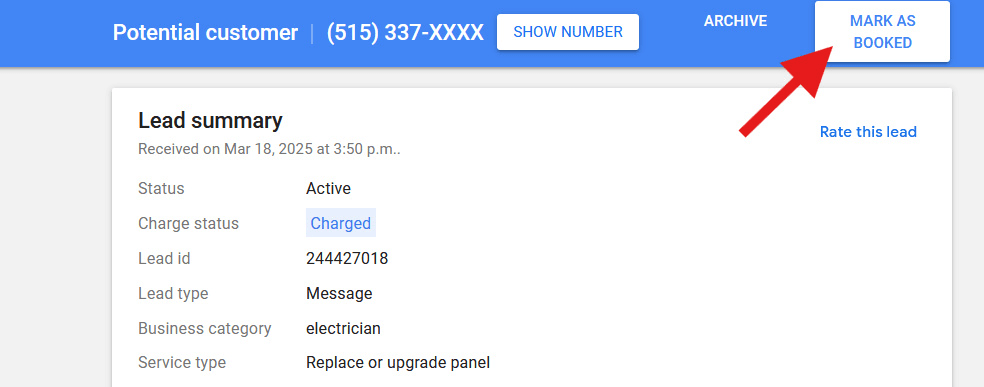
Step 2: Mark it booked
Booked a date? Click Mark as booked → Upcoming and enter the day. Already been out, or they said no, or they just wanted a price? Click Mark as booked → Already complete.
Either way, you are telling Google “this was a real electrical job.” That is what you want.
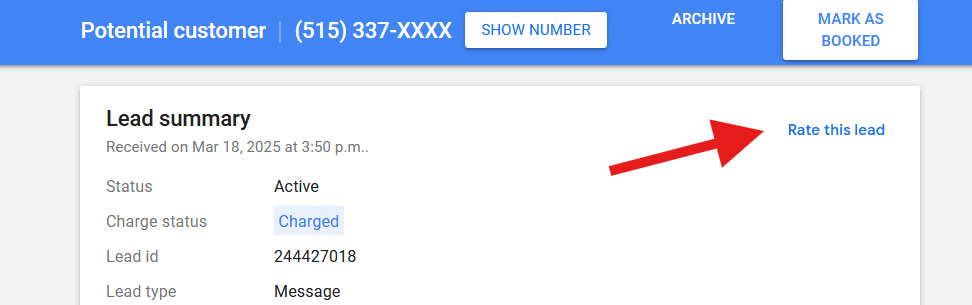
Step 3: Rate it, and be careful with Archive
When Google asks you to rate the lead, pick one of the “satisfied” options. You are not reviewing the customer. You are telling Google “send me more like this.”
Only press Archive when the call was not electrical work at all. Wrong trade, spam, a salesman. If you archive real enquiries, even ones you lost, Google hears “send fewer,” and does.
Step 4: When you win the job, add the price
Once a job is done, go back to the lead, hit Edit, and type in what you charged. Nobody else sees it. But Google now knows that a “panel upgrade” in that suburb turned into $2,800, and it goes looking for more of them.
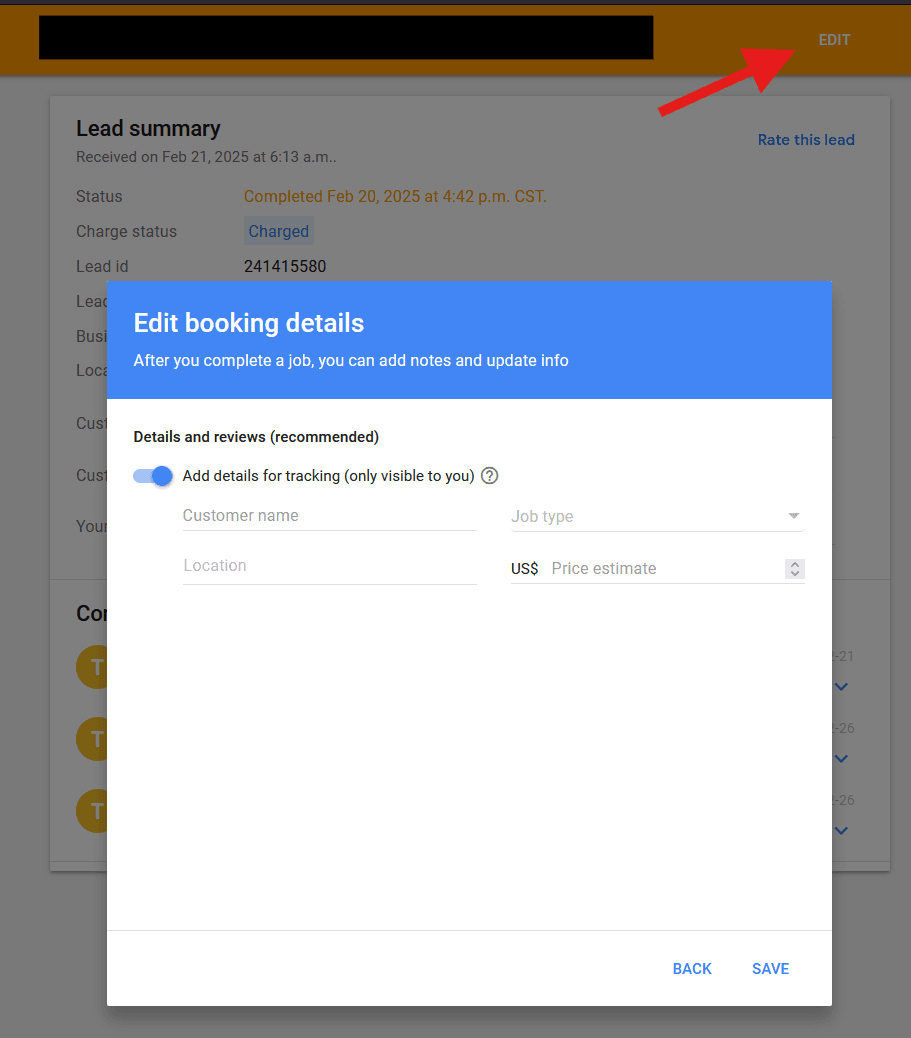
All of that takes about five minutes a day. Let it slide for more than three days and Google starts treating your account as asleep.
How to tell if you are winning
Open Reports. Three numbers matter.
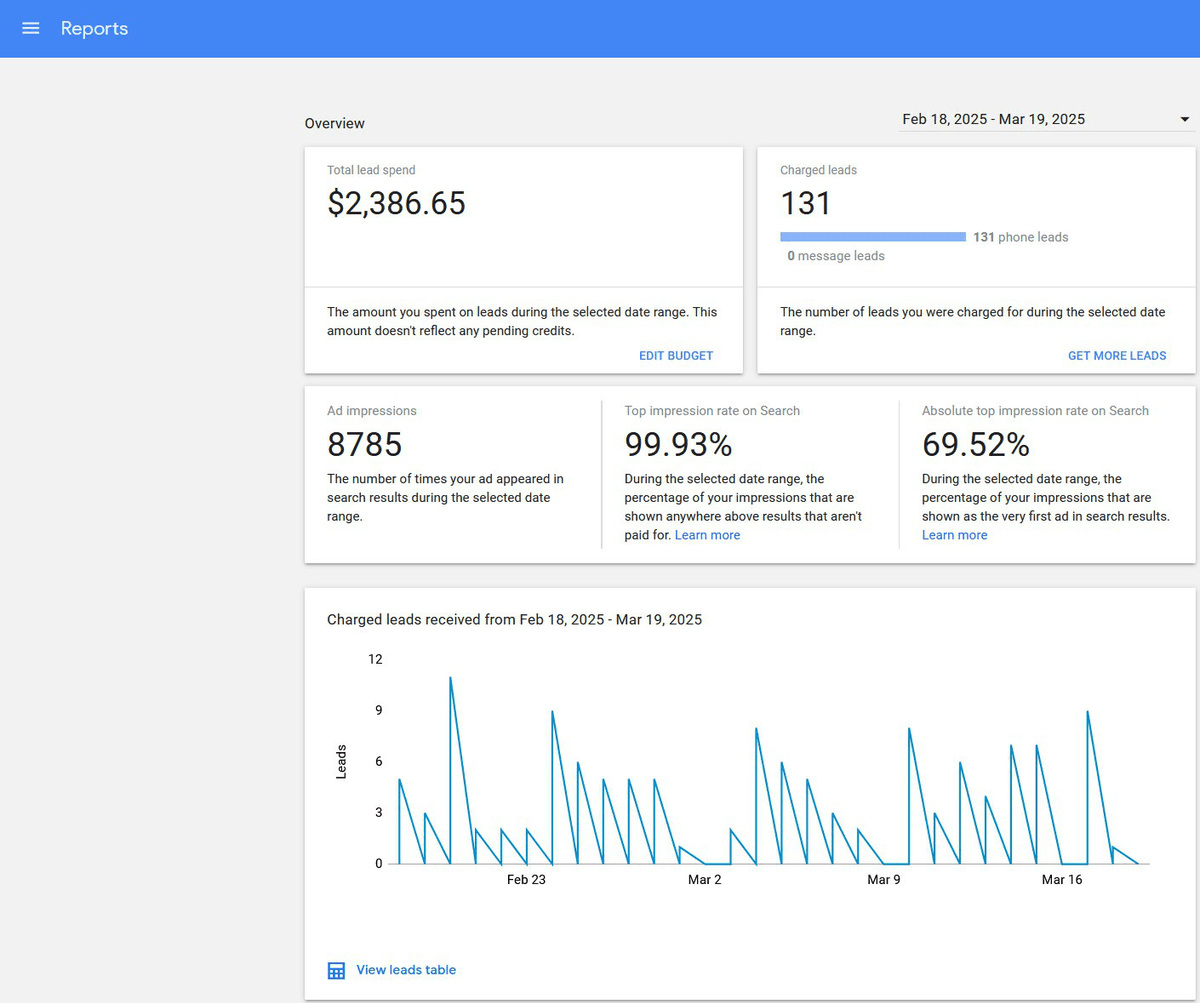
- Total spend and charged leads. Divide one by the other and you have your cost per call. In the month above, about $18.
- “Absolute top impression rate.” Plain English: how often you were the #1 electrician in the box. Above 50% and you are winning your area.
- Cost per booked job. Google will not show you this. Keep a simple spreadsheet or tag LSA jobs in your job software. This is the number that pays the bills.
If your spend is creeping up towards a quarter of your budget and you still want more calls, raise the budget. Otherwise leave it alone.
When things break, and how to fix them
“My application has been pending for weeks”
Almost always a paperwork mismatch. Check your business name and address against your insurance and licence, fix any difference, then phone support and ask them to re-check.
“There is a red warning about billing”
When you sign up for Local Services Ads, Google quietly creates a normal Google Ads account behind it. Sometimes that account gets flagged. Log in at ads.google.com with the same email, clear the warning, and tell support you only use it for Local Services. This one can drag on for months if you leave it.
“I was getting calls every day and now I get none”
Open your leads and look at the dates. If the drop lines up with a stretch of missed calls or unanswered messages, your score took the hit. If you were new, start again properly. If you had been winning for months, be honest with yourself: the same account may never recover, and a fresh Business Profile plus a fresh Local Services account is sometimes the only way back.
“Calls are slowly drying up”
Check the small things: has your service area drifted too wide, did photos disappear, has the inbox sat untouched for a week? Then check your Google Maps listing. If a competitor has overtaken you on reviews and category, that pulls your ads down too.
The 2026 change: LSA is moving into Google Ads
Starting August 2026, Google began moving US electricians out of the separate Local Services dashboard and into the main Google Ads website. If you have not been moved yet, you will be. Google emails you about two weeks before.
What does not change
- You still only pay when someone calls or messages
- Your ad still shows in the same top box on Google and Google Maps
- Your green tick carries over
- Everything in this guide about answering fast and managing leads still applies
What does change
- Your leads now live in Google Ads under Goals → Conversions → Leads
- Your weekly budget becomes a daily budget (Google divides it by seven)
- The option to set your own maximum price per lead goes away
- Your old reports disappear. Download or screenshot them before your move date. Your past leads and customer details do carry over.
- Expect a couple of quiet weeks while it settles
Google’s own write-up is here, and they have a dedicated help line for the move: +1-844-205-0011, Monday to Friday, 9am to 8pm Eastern.
I will publish a click-by-click walkthrough of the new screens once we have moved a shop through it live. Nothing about the phone, the daily habit, or the score changes in the meantime.
The short version
Get the paperwork right. Set the profile up properly once. Answer the phone in under 30 seconds. Spend five minutes a day on your leads.
Most of the electricians in your area will not do that last part. That is your opening, and it costs nothing.
If you would rather have it done for you, we set it up for about $500, then about $25 for each booked call we check. Same setup we use for every electrician on our paid ads and LSA work.

Electrician LSA Questions, Answered Plainly
Yes, for almost every residential electrical shop, as long as someone can answer the phone fast. You only pay when a customer calls or messages you, and you sit at the very top of Google. The catch is simple: miss too many calls and Google quietly stops sending them.
You pay per call or message, not per click. On the accounts we run, a booked job usually costs somewhere between about $30 and $60 in ad spend. You set a budget cap so Google can never spend more than you allow.
Within 30 seconds, most of the time. Google tracks how quickly you pick up. Miss calls or leave people on hold and your ad drops down the list. Messages need a reply the same day.
Local Services Ads first. They are cheaper, you only pay for real calls, and they sit above normal ads. Once they are booking work, add normal Google Ads to fill the gaps.
Inside Google Ads, click Goals, then Conversions, then Leads. That page replaces the old Local Services inbox. Everything else about how the ads work stays the same.
About $500 to set up, then about $25 for each booked call we check and confirm. Not per lead, per booked call. Full pricing is on the get-started page.
Want This Set Up Without the Guesswork?
See how Local Service Rocket works, then book onboarding. No sales calls.